
By Natalia · SEO consultant
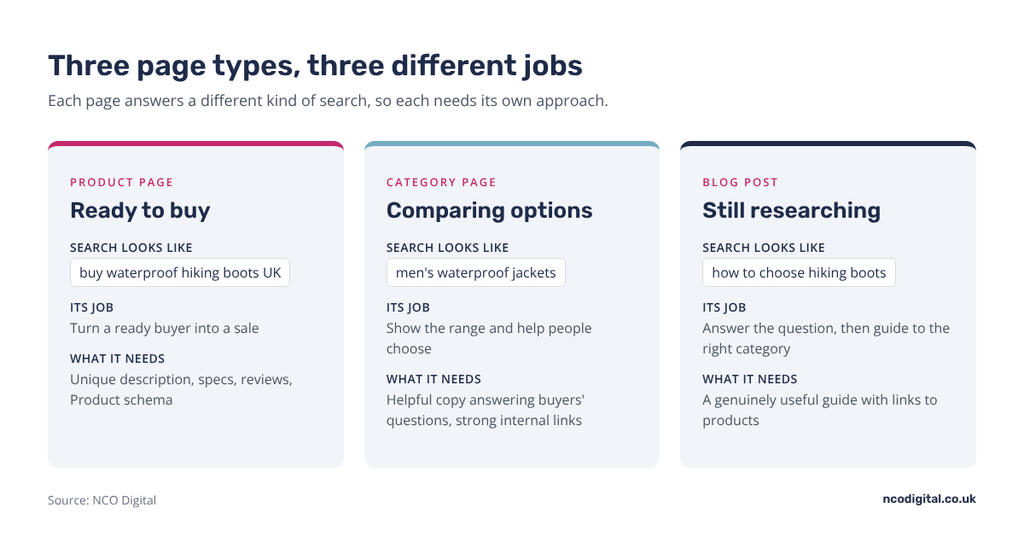
Most ecommerce SEO advice treats every page the same. But product pages, category pages and blog content all need different treatment: different keywords, different technical priorities, different content depth. Get that wrong and you can tick every “SEO basics” box and still not rank. Here’s what actually moves the needle.
Why traditional SEO doesn’t work for ecommerce
Most people approach ecommerce SEO like they would a blog or company website. Write some content, sprinkle in keywords, maybe build a few links. Then they wonder why nothing is working.
The problem is this: you’re not trying to rank informational content. You’re trying to rank pages that need to turn browsers into buyers.
Think about the difference:
- Someone searching “how to choose running shoes” is researching
- Someone searching “buy Nike Air Zoom Pegasus 40 UK size 9” has their card ready
That second search is your money search. The person is ready to buy right now; they just need to find you first. Most ecommerce sites optimise for the wrong keywords, have technical issues they don’t know exist, or don’t give Google what it needs to rank transactional pages. Let’s fix that.
What actually drives ecommerce rankings
After working on some well-known UK ecommerce sites, I’ve seen what separates stores that rank from stores that don’t. It comes down to four core elements.
1. Targeting buyer-intent keywords
Here’s a mistake I see constantly: stores optimise for broad terms like “shoes” or “bracelets” because they have high search volume. But these keywords rarely bring buyers.
You need keywords that say “I want to buy this now”:
- “Buy waterproof hiking boots UK”
- “Silver anniversary bracelet next day delivery”
- “Best wireless earbuds under £100”
These searchers aren’t browsing, they’re buying. They just need to find the right store.
What to do: open Google Search Console and look at your actual search queries. Filter for terms with “buy”, “best”, “cheap”, “near me” or specific product models. These are your money keywords. If you’re not ranking for them, that’s problem number one.
2. Getting your technical foundation right
I’ve seen gorgeous websites that couldn’t rank because of technical SEO issues the owner had no idea existed. The most common problems:
Slow pages. Slow pages cost you both rankings and sales, especially on mobile. Check the Core Web Vitals report in Search Console, then use Google PageSpeed Insights to see exactly what’s slowing each page down.
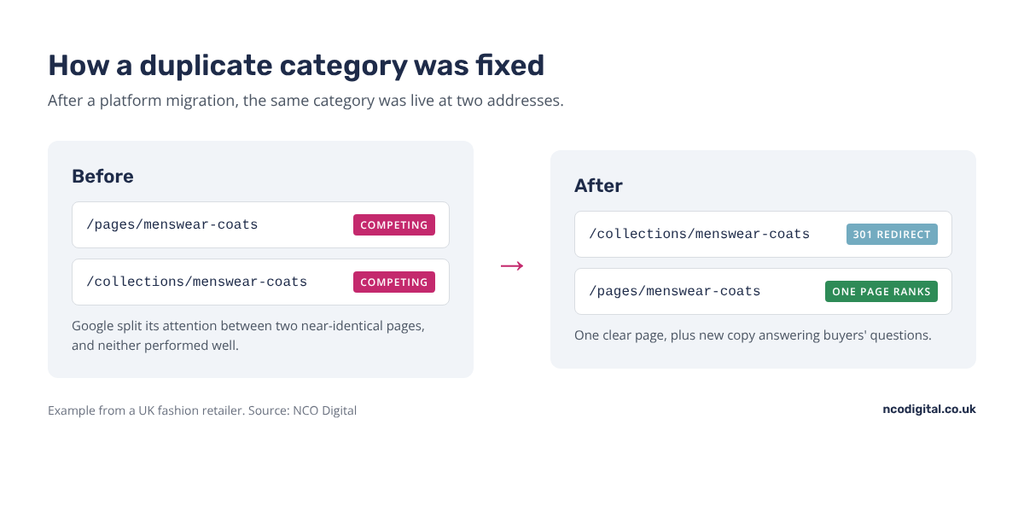
Duplicate content. This is huge for ecommerce. When you sell the same product in five colours, you often create five nearly identical pages. Google has to guess which one to show, and often none of them perform well. A canonical tag tells Google which version is the main one. Google treats it as a strong hint, not a rule, so make sure your internal links and sitemap point to that same version.
What this looked like on a real site. After a platform migration at a UK fashion retailer I worked with, key hub categories were built twice: once under /pages, where they were meant to be, and again under /collections. The two versions competed with each other, and performance dropped. Redirecting the /collections duplicates to the main category pages gave Google one clear page to rank.
Mobile experience. Most of your shoppers are on mobile, and Google uses the mobile version of your site to index and rank it. If your site doesn’t work well on phones, it will hold your rankings back.
Wasted crawl budget. Large stores have thousands of pages, and Google won’t crawl all of them. If it’s busy crawling filter combinations, old sale pages and endless pagination instead of your best-selling products, you’re in trouble.
My guide to technical SEO covers these issues in more detail.
3. Creating product content that converts
Here’s where most stores fail: they copy manufacturer descriptions word for word. Google sees the same text on dozens of other sites, so there’s little reason to rank yours above them. Every important product page needs unique content that answers real customer questions:
- Why should I buy this instead of the alternatives?
- Which size, colour or variant is right for me?
- What are other customers saying?
- Does this solve my specific problem?
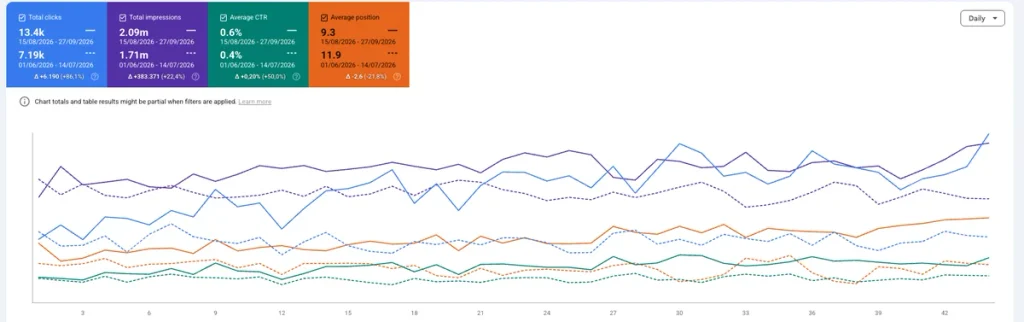
What this looked like on a real site. At the same retailer, we added Product schema to the product page template, including review count and star rating, alongside customer reviews on each page. Nothing else changed on those pages. Comparing six weeks before with six weeks after, clicks to product pages rose by 86% and click-through rate by 50%, while average position improved from 11.9 to 9.3. Autumn is a busier time for fashion, so some of that growth is seasonal. But clicks grew almost four times faster than impressions, which points to richer listings that more people chose to click.
There’s no magic word count, and Google doesn’t rank pages by length. Write enough to answer these questions properly. Yes, it’s time-consuming. Yes, it’s worth it.
Category pages matter even more. They often have higher search volume than individual products and are easier to rank. Add helpful copy to each main category: what’s in it, how to choose, and why someone should buy from this collection. Keep the products near the top, so shoppers don’t have to scroll past text to find them. This is where you win the ranking battle.
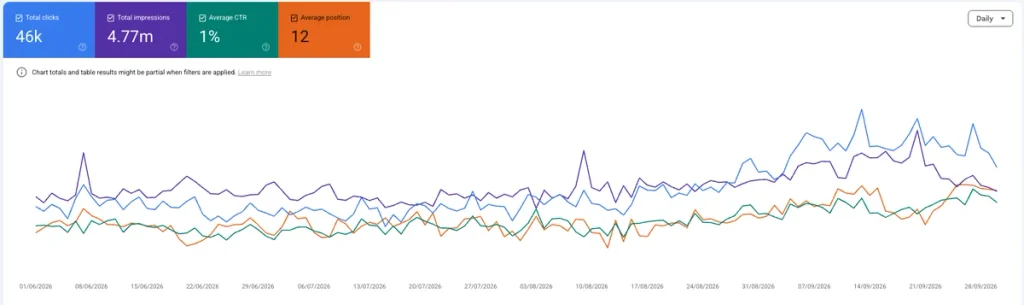
Once the duplicate categories were fixed, we added copy to the retailer’s menswear category pages, answering the questions buyers ask in an FAQ section. Clicks to those pages climbed steadily through August and September.
4. Building links to product and category pages
Most SEO advice talks about building links to blog posts. That’s fine for content sites, but you’re running a store. You need links pointing directly to your products and categories.
This is harder than blog link building, but far more valuable:
- Get products reviewed by bloggers and YouTubers in your niche
- Collaborate with influencers who’ll feature specific products. If they’re paid or gifted, their links should be marked as sponsored (rel=”sponsored”), as Google requires.
- Create genuinely useful resources, like comparison tools or sizing guides, that naturally link to your products
The step-by-step fix
Here’s the process to follow. Don’t skip steps: they build on each other.
Step 1: Understand where you are right now
Before changing anything, diagnose the problem. Open Google Search Console and review the last 3 months:
- Which queries get impressions but few clicks? (You’re ranking too low, or your listing isn’t tempting enough.)
- What’s your average position for your target keywords?
Then open Google Analytics:
- Which landing pages get organic visits but few sales? (Your content or page needs work.)
This data shows you exactly where the opportunities are.
Step 2: Fix critical technical issues first
You can’t build rankings on a broken foundation. Run these checks:
- Google Search Console: the Page indexing report (pages Google can’t or won’t index), Core Web Vitals, and Manual actions
- Google PageSpeed Insights: what’s slowing each page down
- Screaming Frog (or any other crawler): duplicate content, broken links and missing metadata
Step 3: Map out your keyword strategy
For each main product category, identify:
- Primary keyword: high volume plus buying intent
- Secondary keywords: variations and related terms
- Long-tail keywords: specific models, sizes and use cases
Assign each keyword to one specific page. Don’t target the same keyword on several pages: they’ll compete with each other, and both will rank worse.
Step 4: Rewrite your top category pages
Start with your 5 highest-traffic categories. For each one:
- Write unique, helpful copy that answers what shoppers need to know
- Answer the most common customer questions for that category
- Include your target keywords naturally (don’t stuff them)
- Add customer reviews and ratings if possible
- Include clear calls to action
This is tedious work. It’s also the difference between ranking and staying invisible.
Step 5: Optimise your best-selling products
You can’t rewrite every product page at once. Prioritise:
- Your bestsellers (by revenue)
- Products targeting high-volume keywords
For each priority product:
- Write a unique description
- Include detailed specifications
- Add an FAQ section answering common questions. It helps shoppers, even though Google now only shows FAQ rich results for government and health sites.
- Add Product schema markup (price, availability, reviews), so your products can show rich results in Google
- Make sure images have descriptive alt text
- Enable customer reviews and actively ask for them
Step 6: Create supporting content
Build blog content for early-stage searchers, then guide them to your products:
- “How to choose [product type]” → links to the relevant category
- “[Product] buying guide” → links to specific products
This captures people at the research stage and guides them towards a purchase.
Step 7: Launch your link building campaign
Reach out systematically to:
- Product reviewers and bloggers in your niche
- Journalists writing gift guides or buying roundups
- Industry publications, for features or expert quotes
- Complementary businesses, for partnership opportunities
Quality beats quantity every time. One link from a respected website is worth more than 100 directory listings.
Common mistakes that hold ecommerce rankings back
Mistake 1: Optimising for search volume instead of buying intent. For example, “silver bracelet” might get 10,000 searches a month, and “buy silver anniversary bracelet UK delivery” only 200. But the second one converts. Choose intent over volume.
Mistake 2: Ignoring internal linking. Your category pages should link to top products. Your blog should link to relevant categories. Your products should link to related items. This helps Google understand your site structure and send ranking power where it matters.
Mistake 3: Treating every page as equally important. Focus your effort on the pages that drive revenue: your main categories and bestsellers deserve most of your attention. Low-value filter and sort combinations should be kept out of Google’s index.
Mistake 4: Giving up too early. Ecommerce SEO often takes 3 to 6 months to show meaningful results. I’ve seen stores give up at month 2, right before they would have started ranking. Stick with it.
Tracking what actually matters
Set up proper measurement from day one.
In Google Analytics:
- Organic traffic trend: growing or flat?
- Organic conversion rate: are visitors buying?
- Revenue from organic traffic: the number that matters most
- Top landing pages by revenue: double down on these
In Google Search Console:
- Are clicks, impressions and average position growing?
- Are new keywords appearing?
- Is your click-through rate improving?
Review monthly. If you’re not seeing improvement by month 4, something is usually wrong with the execution, so revisit your strategy.
Final thoughts
Ecommerce SEO isn’t mysterious, but it is specific. You can’t treat product pages like blog posts, or category pages like service pages. They have different goals, different ranking factors and different optimisation strategies. The stores that win consistently:
- Target keywords that show buying intent, not just research intent
- Keep technical SEO tight: fast, mobile-friendly, no duplicate content
- Write unique, helpful content for every important page
- Build links to products and categories, not just blog posts
- Track results and adjust based on what the data shows
Start with technical fixes and get that foundation solid. Then tackle content. Then links. In that order.
Your customers are searching for exactly what you sell. The only question is whether they’ll find your store or your competitor’s.
Want a hand? See how I help online stores with ecommerce SEO, or read how I doubled a client’s organic revenue in 6 months.
About the author
Natalia is the SEO consultant behind NCO Digital. She has over 15 years in ecommerce and 6+ years of hands-on SEO at major UK brands, specialising in technical and ecommerce SEO. More about Natalia